Habit Tracker Widget: 6 Best Home Screen Apps (2026)
A good habit tracker widget turns the check-in from "unlock, find the app, wait, tap, confirm" into one tap on a screen you were already looking at. That's the difference between a tracker you use and one that sits in a folder.
The catch nobody mentions: "has a widget" covers everything from a glanceable tile to a real checkbox, and most developers never say which they ship. So this guide sorts six apps by what their own listings claim the widget does — and says where the claim isn't there.
TL;DR — best habit tracker widgets right now
- Best tap-to-check widget, both platforms: HabitKit — its developer states you can "check off without opening the app", but the widget itself is a paid Pro feature.
- Best free Android widget: Loop Habit Tracker — free, open source, ad-free, no in-app purchases.
- Best Android widget for progress-style habits: HabitNow — widgets built around consulting and tracking daily progress.
- Best on Apple hardware: Streaks — $5.99 once, no subscription, home screen and Apple Watch.
- Best glance widget with no account: HabitBox (our app) — habits and streaks on the iPhone home screen, no sign-up.
- Best cross-platform tracker with widgets: Habitify — iOS, Android, Mac, Windows, web and Apple Watch.
Three caveats before the table: HabitKit's widgets are locked to its paid Pro tier, HabitBox's widget is an iPhone feature, and Habitify's widgets are documented in the developer's help centre and changelog rather than on either store listing.
How this list is compiled
No three-week lab test, no invented stopwatch numbers. On 21 September 2026 every price, rating, platform and widget claim below was read from a primary source: each app's US App Store listing (including its in-app purchase list), its Google Play listing (including the store badges), and the developer's own site. A capability appears here only if the vendor documents it. Where a vendor is silent — free-tier caps, lock screen support, whether the widget is tappable — this page says so instead of guessing.
Why widgets matter — the friction argument
BJ Fogg's behavior model — B = MAP (Behavior = Motivation × Ability × Prompt) — says a behavior happens when motivation, ability and a prompt line up at the same moment. Motivation is the one you can't schedule. Ability is the one you can engineer.
A widget doesn't make you want to track. It deletes steps. Checking in inside the app means unlock, find the icon, wait, find the habit, tap, confirm, leave. A widget with a real checkbox is one tap; a widget without one still removes the "find the app" step. The seconds saved are beside the point — anyone quoting a precise figure made it up. Every step you remove is one fewer place to quit.
What "interactive" actually means on each platform
On iPhone. Before iOS 17 (September 2023) widgets were view-only: tapping one opened the app. iOS 17 added interactive widgets to WidgetKit, so a tap can be handled without launching anything. iPhones now ship iOS 27, so the capability is years old — but an app only has it if the developer built it, and most trackers won't say.
On Android. Google's widget documentation notes that Android 12 "adds support for stateful behavior" using CheckBox, Switch and RadioButton — the building blocks of a tappable widget. That has been available for years, which is why the strongest tap-to-track widgets here are Android ones.
Lock screens. iOS supports lock screen widgets in its circular and rectangular slots. Google's app widget guide doesn't cover lock screen widgets, and placement varies by manufacturer, so treat a lock screen habit widget as an iPhone feature.
To see the difference on a real home screen, Bill McLean's December 2024 comparison of HabitKit, Streaks and Forte shows HabitKit's widget checking off one habit at a time, while in his setup the Streaks widget only showed status and Forte had no interactive widget. He quotes prices from memory and features may have changed since, so use the table below for current details:
Comparison table — 6 habit tracker widgets
| App | Platforms | What the developer says the widget does | Price | Store rating |
|---|---|---|---|---|
| HabitKit | iOS + Android | "Grids and streaks on your home screen. Check off without opening the app." — Pro only | Free for up to four habits; Pro $1.99/mo, $11.99/yr or $29.99 lifetime | 4.8 App Store / 4.6 Play |
| Loop Habit Tracker | Android only | "Track your habits directly from your home screen, with beautiful and colorful widgets." | Free, no in-app purchases, no ads | 4.7 Play |
| HabitNow | Android only | "App widgets to easily consult and track daily progress." | Free to download; one-time premium unlock | 4.7 Play |
| Streaks | iPhone, iPad, Apple Watch, Mac, Vision Pro | "Widgets for your phone's home screen"; a Today Widget that lets you "view and complete your tasks"; Watch complications | $5.99 one-time, no in-app purchases | 4.8 App Store |
| HabitBox (our app) | iPhone widget; app on iOS + Android | "Add widgets to your home screen to see your habits and streaks at a glance." | Free to start, optional Plus | — |
| Habitify | iOS, Android, Mac, Windows, web, Apple Watch | List, heatmap, streak and logging widgets (developer widget guide); neither store listing mentions widgets | Free tier (3 habits); Plus from $29.99/yr, Pro to $119.99 lifetime | 4.6 App Store / 4.2 Play |
Only HabitKit names its widget sizes — "small, medium, and multi-habit" on the App Store. The other five publish nothing about sizes, so there's no S/M/L column to guess at.
The 6 apps in detail
1. HabitKit — the clearest tap-to-check claim
Rating: (4.8/5) — 4.8 from 2,425 US App Store ratings, 4.6 from 11,795 on Google Play.
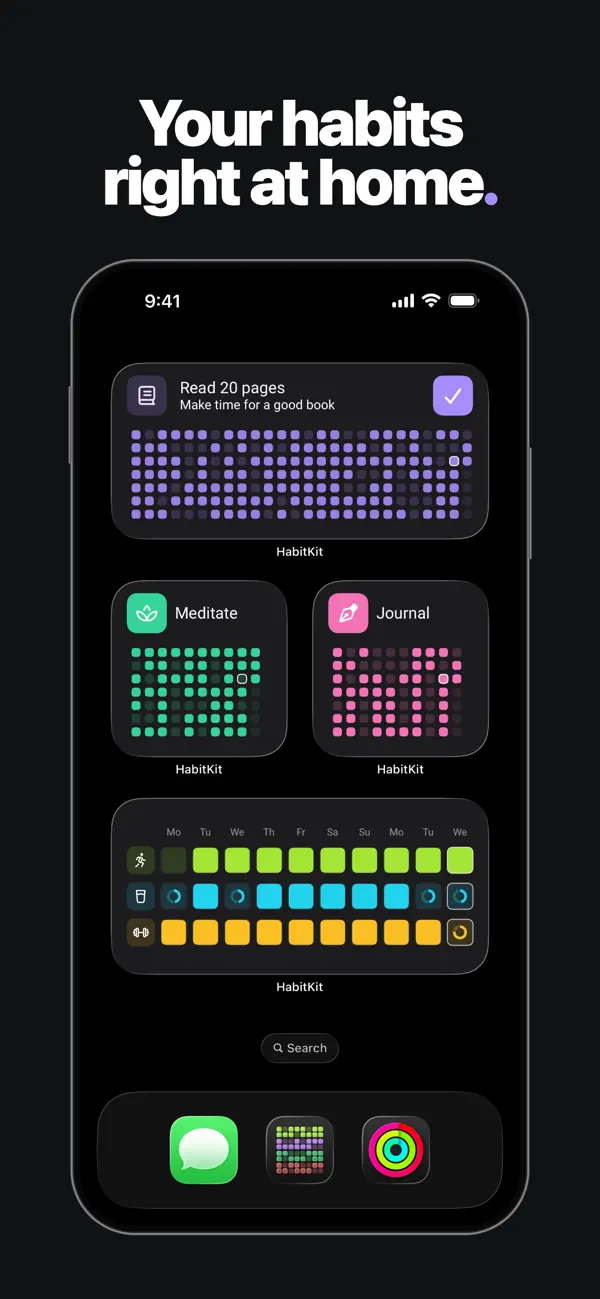
HabitKit shows habits as a tile grid, like a GitHub contribution graph for your life, and its developer states outright what the widget does: "Grids and streaks on your home screen. Check off without opening the app." The App Store listing adds the sizes — "small, medium, and multi-habit widgets" that follow your theme.
Strengths: the best-looking streak visual in the category, and the clearest privacy line: "No account. No sign-up. No ads. Your habit data stays on your device, and the app works completely offline." No ads badge on Google Play either. On App Store and Google Play.
Trade-offs: read the listing before you download for the widget. HabitKit's own description says the app "is free to use with up to four habits" and that Pro unlocks home screen widgets along with unlimited habits, import/export and extra reminders — so the tap-to-check widget is a paid feature, not a free one. Pricing is also less simple than its "one-time unlock" reputation: the App Store lists Pro at $1.99 monthly, $11.99 yearly and $29.99 lifetime.
Best for: people who want a contribution-grid aesthetic and a widget they can actually tap — and who will pay for Pro to get it.
2. Loop Habit Tracker — the free Android answer
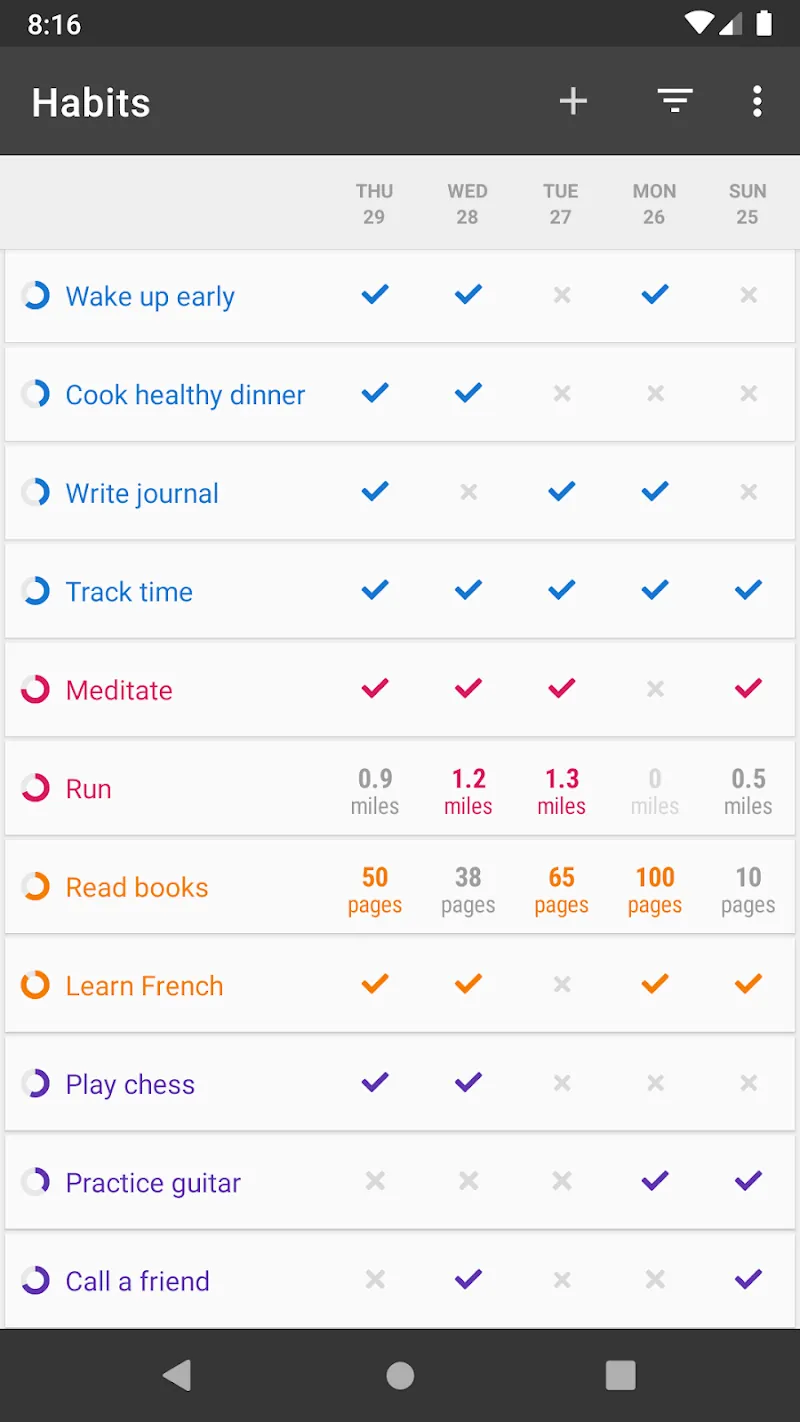
Rating: (4.7/5) — 4.7 from 63,305 Google Play ratings.
Loop's Play listing puts it simply: "Track your habits directly from your home screen, with beautiful and colorful widgets." The app is "completely ad-free and open source", carries no in-app purchases badge, and exports to CSV or SQLite.
Strengths: genuinely free with nothing to unlock, no account, no ads. Detailed charts and a habit strength score.
Trade-offs: Android only, and the interface is utilitarian. Its last Play update was 14 September 2025 — stable rather than actively evolving.
Best for: Android users who want a free, open-source tracker with a widget and no upsell.
3. HabitNow — Android widgets for counted habits
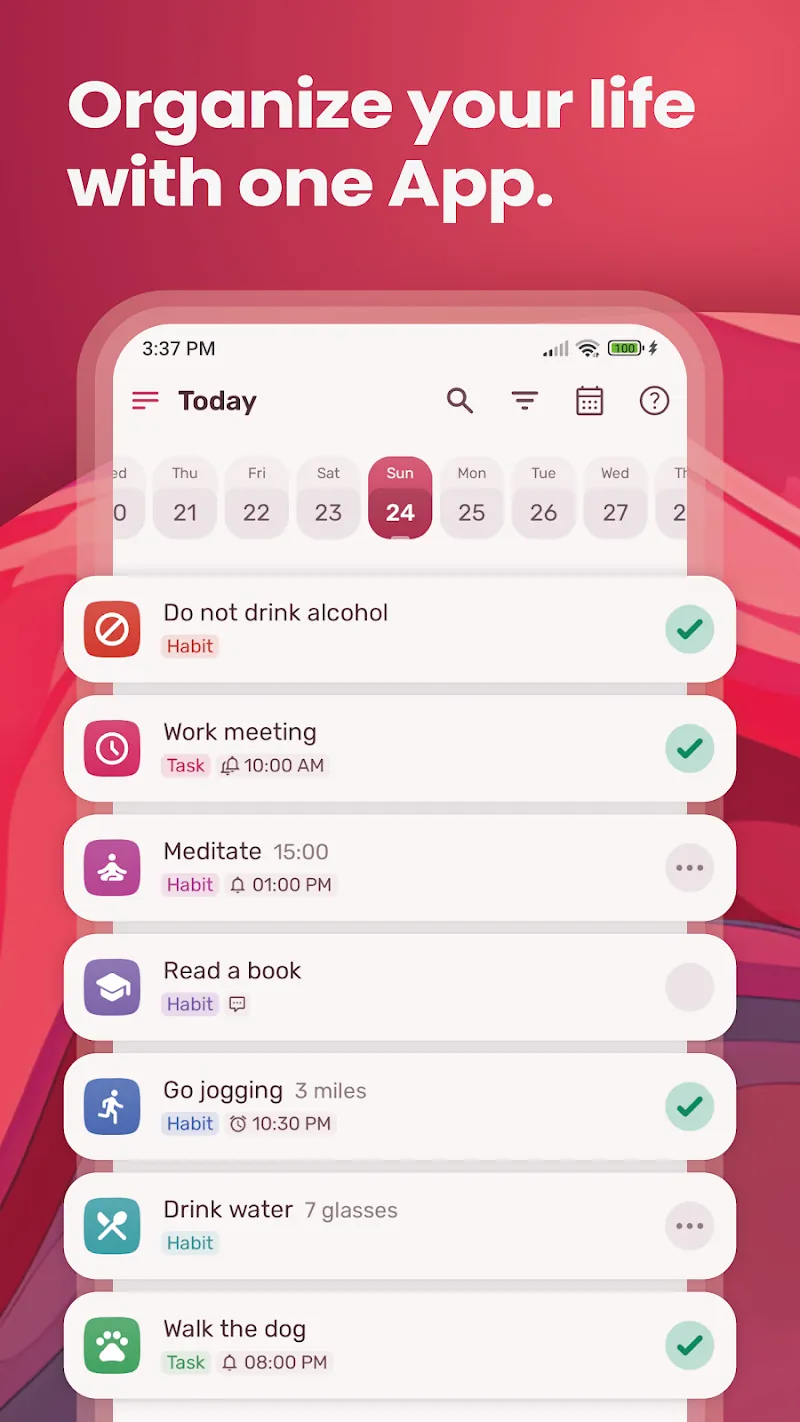
Rating: (4.7/5) — 4.7 from 92,695 Google Play ratings.
HabitNow's listing has a dedicated widgets section: "Discover the convenience of app widgets to easily consult and track daily progress." That fits an app built for counted and timed habits ("drink 8 glasses of water") as well as yes/no checks.
Strengths: flexible habit types, a big and well-rated user base, no "Contains ads" badge on Google Play, and a one-time premium unlock rather than a subscription. Google Play listing.
Trade-offs: Android only, and the free tier's exact limits aren't published anywhere. Its "lock screen" feature is an app lock for privacy, not a lock screen widget — easy to misread.
Best for: Android users tracking quantities and durations, not just check marks.
4. Streaks — the polished Apple option
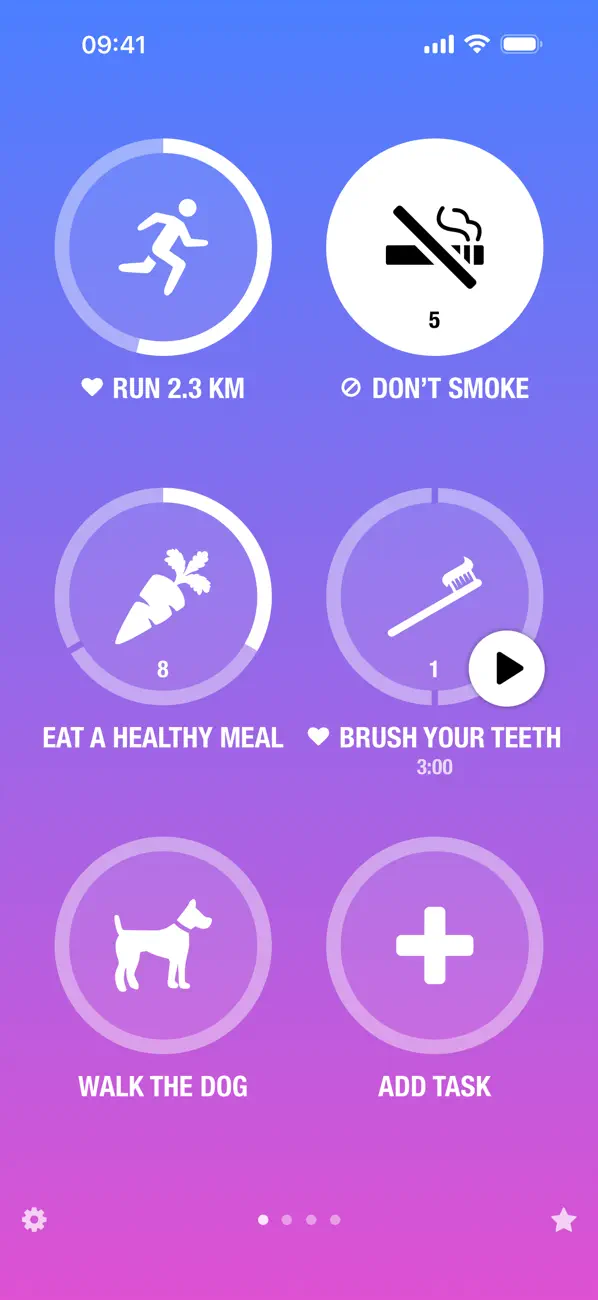
Rating: (4.8/5) — 4.8 from 27,351 US App Store ratings.
Streaks is an Apple Design Award winner and its listing includes "Widgets for your phone's home screen" alongside 78 colour themes and over 600 task icons. It also says its "Today Widget allows you to quickly view and complete your tasks", and the developer's site promises Watch complications and widgets that let you "mark a task as complete".
Strengths: $5.99 once, with no in-app purchases at all — the only app here you can finish paying for. Health app integration completes some tasks automatically. Runs on iPhone, iPad, Apple Watch, Mac and Vision Pro with iCloud sync.
Trade-offs: Apple platforms only, and capped at 24 tasks by design. Switch to Android and your data doesn't follow. (Cross-platform options in our Streaks alternatives roundup.)
Best for: people on Apple hardware who would rather pay once. App Store listing.
5. HabitBox — a glance widget with no account
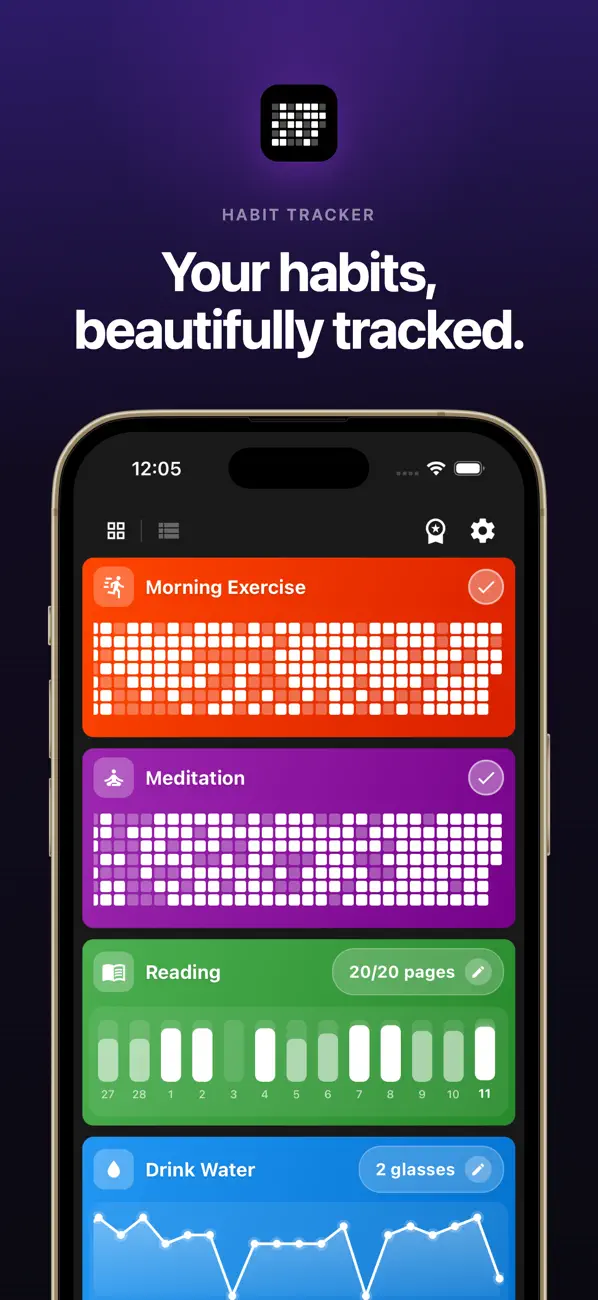
HabitBox is our own app — the one this blog belongs to — so read it with that in mind. The iPhone listing describes the widget plainly: "Add widgets to your home screen to see your habits and streaks at a glance." That's a glance-and-open widget, not a documented tap-to-check one, and it's an iPhone feature — the Android app doesn't ship a home screen widget yet.
Strengths: no sign-up and no account. Habits live on the device, with optional iCloud sync to your own iCloud on iPhone and a Plus export/import backup file for moving between Android devices. No ads badge on Google Play, and charts and statistics aren't gated.
Trade-offs: no widget on Android yet, no documented lock screen widget, no social or challenge features. HabitBox is free to start, with an optional Plus upgrade that lifts the habit cap and adds multiple reminders per habit, export, import and archiving. (For a gamified style, see our Habitica alternatives roundup.)
Best for: iPhone users who want a clean grid on the home screen without creating an account.
6. Habitify — widgets inside a multi-platform tracker
Rating: (4.6/5) — 4.6 from 7,128 US App Store ratings, 4.2 from 6,598 on Google Play.
Habitify runs on iOS, Android, Mac, Windows, the web and Apple Watch, and its changelog announces Android widgets for current streak and current progress. Worth knowing: neither store listing mentions widgets today, but its widget guide describes several variants — some taps open a logging popup or the app, and the Days Since widget has no check-in button.
Strengths: the widest platform spread, automatic logging from Apple Health, Google Health/Fit, Fitbit, Strava and Screen Time, plus strong analytics. App Store · Google Play.
Trade-offs: the free tier is capped at three habits, and there are now two paid tiers — Plus (from $29.99 a year) and Pro (up to $119.99 lifetime, with a 7-day trial). The Android app rates noticeably lower than the iOS one.
Best for: people tracking on several devices who want analytics as much as a widget.
Checked, and left out
Productive used to appear on this list. It no longer does: its Google Play listing, its App Store listing and its own website make no mention of a widget of any kind, and Play reviewers repeatedly ask for one. Its Android listing sits at 3.7 stars from 20,884 ratings, last updated November 2025. A tracker without a documented widget doesn't belong in a widget roundup.
How to set up a habit tracker widget
On iPhone (iOS 17 or later)
- Long-press an empty area of the home screen, then tap the + in the top-left corner.
- Search for the tracker app by name.
- Choose the widget size — small for a single habit, larger for a row or grid.
- Tap Add Widget, then Done.
- To pick which habit appears, long-press the widget and choose Edit Widget.
For lock screen widgets, long-press the lock screen, tap Customize then Lock Screen, tap the widget bar below the clock, and choose your tracker's widget if it offers one.
On Android (Android 12 or later)
Setup varies by manufacturer (Pixel, Samsung, OnePlus), but the general flow is:
- Long-press an empty area of the home screen, then tap Widgets.
- Scroll to the tracker's widget collection.
- Long-press the widget you want and drag it to a free space.
- If it supports configuration, a setup dialog opens — pick which habit it shows.
If the widget supports resizing, drag a corner after placement.
Which widget should you pick?
- Android, free, no strings: Loop Habit Tracker.
- Android, counted or timed habits: HabitNow.
- A widget you can tap to check off, on either platform: HabitKit, once you buy Pro.
- Apple hardware, pay once: Streaks.
- iPhone, no account, clean grid: HabitBox.
- Tracking across phone, Mac and web: Habitify.
Can't decide? Put two free widgets on your first home screen for two weeks and delete the one you reach for less.
For comparisons that aren't widget-focused, see our roundups of the best habit tracker apps and daily habit tracker apps. If paying nothing matters more than the widget, our free habit tracker guide checks what each app's free tier covers.
What to look for in a widget
A tap target you can hit without aiming. If you have to aim, you'll skip the check.
A visible streak, not just a checkbox. Showing the current streak adds a reward signal to the glance — the same loop-closing mechanism described in our piece on the habit loop.
Reliability. It should update within a second or two of a tap. Widgets that lag or drop taps train you to distrust them, and once trust is gone the friction is back.
Honest platform support. Plenty of trackers ship a widget on one platform and not the other, or behind a paywall. Check the listing for the phone you carry.
Common widget mistakes
Putting it on a screen you don't see daily. A widget only helps on the first home page or the lock screen. Bury it on page three and nothing changes.
Adding too many at once. Two or three at most. A wall of habit widgets becomes visual noise and stops getting tapped.
Assuming the widget is tappable — or free. Most trackers don't say, and HabitKit's is Pro-only. If checking off from the home screen is why you're installing, verify it in the first five minutes.
FAQ
Do habit trackers have widgets?
What's the best free habit tracker with a widget?
Which habit tracker widget can I check off without opening the app?
Can I put a habit tracker on the lock screen?
Does Apple have a habit tracking app?
Is there a habit tracker widget for Notion?
Is there a free Android habit widget without a subscription?
Where to start
If you've never used a widget tracker: pick three daily habits, install one app from this list for the phone you actually carry, put its widget on the first page of your home screen, and track for 14 days through the widget rather than the app. Then compare that fortnight against whatever you used before.
The widget is the part most people skip, and it decides whether tracking survives a bad week.

Mira Hartwell
Editor, HabitBoxEditor at HabitBox. Writes about habit science and productivity, grounding every post in named research (Lally, Wood, Walker, Huberman) instead of recycled advice. Read full bio →