TickTick Review 2026: Worth It?
This TickTick review covers a free task manager that bundles 5 tools in one: tasks, a calendar, a Pomodoro timer, a habit tracker, and smart lists like an Eisenhower Matrix. It's one of the most feature-complete free apps in 2026, with a generous free tier and a Premium plan at $49.99/year. The catch is that some of its best features — including deeper habit tracking — sit behind that paywall. Here's what it does well, where it falls short, and who it actually fits.
Last updated: October 2026.
Who it's for: People who want one affordable app that handles tasks, a calendar, focus sessions, and light habit tracking — and don't mind a functional-over-beautiful design.
What is TickTick?
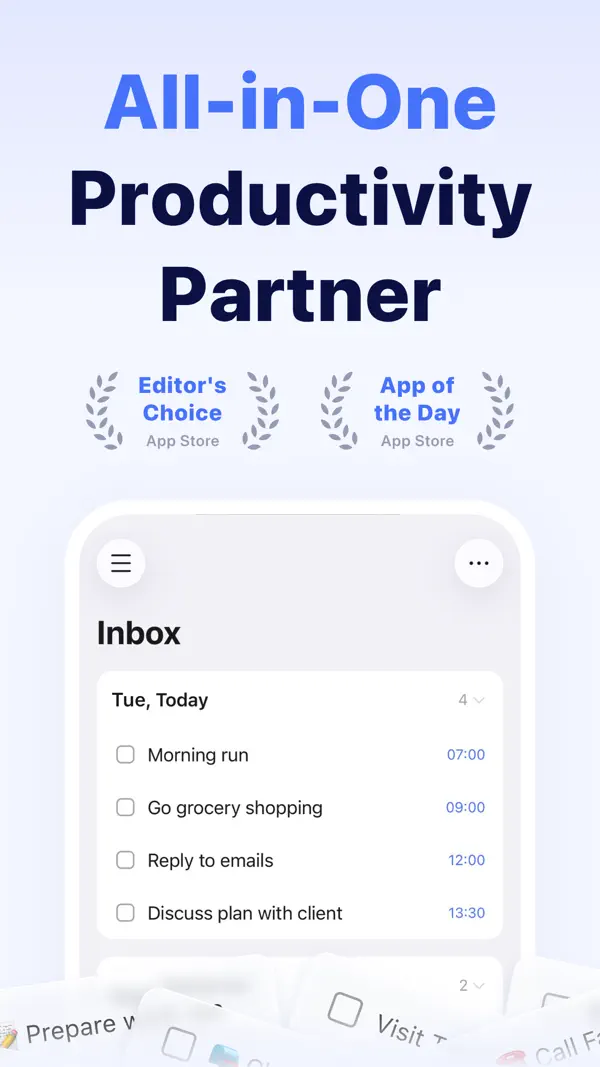
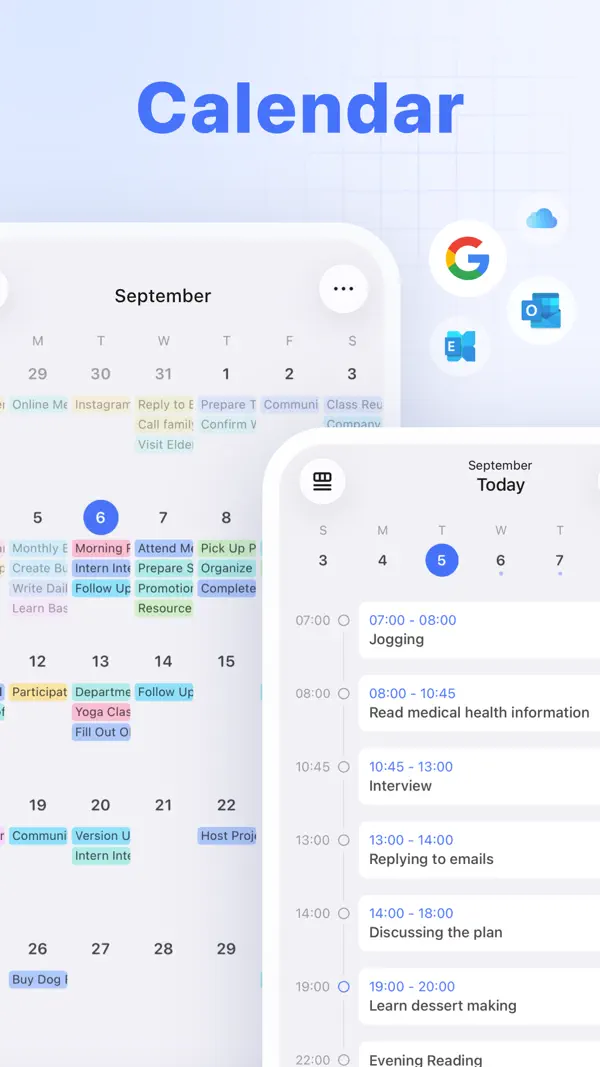
TickTick is a cross-platform task manager that runs on iOS, Android, web, Windows, and macOS, with sync across phones, tablets, and even watches. At its core it's a to-do app: you capture tasks, set due dates, add subtasks, and organize lists. What sets it apart from a plain checklist is everything it bundles around that core.
Most task apps do one job. TickTick stacks several into one interface, and that is the whole pitch. You don't pay for a separate calendar app, a focus timer, and a habit tracker. You get all of them in one place. Independent reviewer Murat Esmer switched to TickTick after a long search. He called the bundled habit tracker a "surprise" feature that beat his expectations.
The trade-off is breadth over depth. Each module is solid rather than best in class. A power user of any one tool may find a dedicated app does that single job better. A heavy calendar user might miss features from a full calendar app. A serious habit builder will want more than the bundled tracker offers. For most people, though, "good at five things in one app" beats juggling five apps.
That breadth is also why TickTick keeps showing up when people search for a free task manager. It does enough out of the box that you rarely feel pushed to add another tool. The next sections break down what you actually get, starting with the price.
TickTick pricing: free vs Premium
TickTick's free plan is unusually generous, which is a big reason the app shows up so often in "best free task manager" lists. You get tasks, subtasks, recurring items, a basic calendar, the Pomodoro timer, and a habit tracker without paying anything.
The free tier does have ceilings. You're capped at around 9 lists, 99 tasks per list, and 19 subtasks per task. Most casual users never hit those limits, but heavy planners might. The free habit tracker is capped at about 5 habits. Richer calendar views and advanced statistics are also gated.
Premium costs $49.99 a year, which works out to about $4.17 a month. Students and teachers get a 25% education discount. Upgrading unlocks full calendar views, custom smart lists, advanced statistics, themes, more habits, and much higher list and task limits. At about $4 a month, it's one of the cheaper productivity subscriptions you'll find. Esmer described it as "one of the cheapest tools" in his entire stack.
The honest read is simple. The free plan is enough to run your tasks and a few habits. You upgrade when you want the calendar overlay, deeper stats, or more than a handful of habits. You don't upgrade because the free version is crippled, because it isn't.
If you're on the fence, start free. The app makes it easy to feel out the limits before you spend anything, and the upgrade is cheap if you decide you want it.
Feature walkthrough
TickTick's strength is the spread of tools under one roof. Here's what each of the main modules offers.
Tasks and smart lists. The core to-do engine handles natural-language input. Type "gym tomorrow at 7am" and it parses the date for you. It also covers recurring tasks, priorities, tags, and subtasks. Smart views layer on top: a Kanban board, a timeline, sticky notes, and an Eisenhower Matrix that sorts tasks by urgency and importance. If you've used a four-quadrant system before, the Eisenhower Matrix view is one of the cleaner built-in versions.
Calendar. TickTick shows your tasks and events in yearly, monthly, weekly, daily, and agenda formats. The headline feature is overlaying tasks onto a calendar, so your to-dos and your schedule live in one view. That's handy if you block time on a calendar rather than working from a flat list. Full calendar functionality is a Premium feature, and a few reviewers note occasional sync delays.
Pomodoro timer. A focus timer is built right in. It breaks work into 25-minute intervals, with a stopwatch mode and focus stats over time. Because the timer sits next to your task list, you start a session against the thing you're meant to be doing. That removes a step and a small excuse. If you want to go deeper on the method, see our guide on how to focus better.
Habit module. TickTick includes a dedicated habit section with streaks, completion rates, and trend stats. It's more than an afterthought, and it's the part most reviews skim over. So it gets its own honest assessment below.
Pros and cons
Here's the balanced view in one table, optimized so you can skim the trade-offs at a glance.
| Pros | Cons |
|---|---|
| Bundles tasks, calendar, Pomodoro, and habits in one app | Each module is competent, not best-in-class |
| Genuinely useful free tier | Best calendar and habit features are Premium-gated |
| Cheap Premium at $49.99/year (~$4.17/mo) | Free tier caps lists, tasks, and habits |
| Cross-platform: iOS, Android, web, Windows, macOS | Functional design rather than polished or beautiful |
| Natural-language input and flexible smart views | Reviewers report occasional calendar sync delays; basic API and light team features |
TickTick's habit tracker, assessed honestly
This is where most reviews go quiet, so let's be specific. TickTick's habit module is real: it tracks daily habits alongside tasks, surfaces them in your morning view, counts streaks, and shows completion rates and trends over time. For someone who wants to keep "meditate" and "drink water" next to their to-do list, it does the job without a second app.
The limits show up once habits become your main focus. The free plan caps you at roughly 5 habits, so building a fuller routine pushes you toward Premium. The analytics are present, but they stay shallow next to purpose-built trackers. You get streaks and completion percentages. You don't get the dense calendar heatmap that lets you spot patterns across weeks and months at a glance.
You also can't customize each habit as finely. A dedicated tracker lets you set count-based goals, like eight glasses of water, and group habits into categories. TickTick keeps it simple, which is fine for a short list and limiting once your routine grows.
That distinction matters because tasks and habits are different jobs. A task is a one-off you finish and delete. A habit is a recurring behavior you're trying to make automatic. Research from University College London found new habits take a median of 66 days to form, not the popular 21-day figure. Tracking that kind of timeline well means visual streak feedback you check every day. That daily feedback loop is exactly the depth a bundled module tends to skip.
So here is the honest call. If habits are a side note to your task list, TickTick's module is plenty. If building habits is the main thing you're trying to do, a dedicated tracker like HabitBox (our own app) gives you the heatmap view, longest-streak tracking, and per-habit analytics that the bundled version leaves out. It's built around that single job rather than bolted onto a to-do app. Many people happily run both: TickTick for tasks, a focused tracker for routines. For a tour of dedicated trackers — from minimal check-in apps to lighter Habitica alternatives — we've compared the field separately.
Who should use TickTick
TickTick fits best if you want one app that covers most of your day. You manage a mix of tasks, a calendar, and focus sessions, and you'd rather not stitch three apps together. The price seals it, since few all-in-one tools cost this little.
It's also a strong pick if you're switching from a pure task manager and want a bit more. The calendar overlay and Pomodoro timer add real range without a steep learning curve. People moving over from Todoist tend to feel at home within a day, because the core ideas map across almost directly.
It's a weaker pick in two cases. First, if you care most about design polish, you'll notice TickTick favors function over beauty. Second, if your real goal is building habits, the bundled tracker will feel thin once you pass a handful of routines. In that case, pair it with a focused tracker, or lead with one and let TickTick handle the to-dos.
TickTick alternatives
TickTick isn't the only all-rounder. Its closest rival is Todoist, which is more polished and arguably better at pure task management. TickTick wins on bundled extras and price. If you want something built natively for Apple devices, Things 3 is the design-led pick. Microsoft To Do and Google Tasks are free and fine for basic lists, though they skip the calendar and habit extras.
For a fuller rundown of options and when each one fits, see our guide to Todoist alternatives, since most of those apps compete with TickTick too. And if your real goal is routines rather than tasks, compare options in our roundup of the best habit tracker app. The right pick comes down to one question: are you mostly tracking tasks, mostly building habits, or both?
The verdict
TickTick earns its reputation as one of the best free task managers in 2026. The free tier is genuinely useful, the Premium upgrade is cheap, and bundling tasks, a calendar, a Pomodoro timer, and habits into one app removes a lot of friction. You stop hopping between tools and start working from a single screen.
It isn't flawless. The design is functional rather than pretty, some reviewers report calendar sync lag, and the habit module thins out fast once routines become your focus. None of those are dealbreakers for the average user. They're the predictable cost of an app that tries to do five things at once and mostly succeeds.
If you want one affordable hub for your tasks and schedule, TickTick is an easy recommendation. If you're chasing habit-building specifically, treat the bundled tracker as a starting point and reach for a dedicated tool when you outgrow it.
TickTick review FAQ
Is TickTick free?
Is TickTick Premium worth it?
Does TickTick have a habit tracker?
Is TickTick better than Todoist?
Is TickTick safe and private?

Mira Hartwell
Editor, HabitBoxEditor at HabitBox. Writes about habit science and productivity, grounding every post in named research (Lally, Wood, Walker, Huberman) instead of recycled advice. Read full bio →