Morning Routine Apps: 7 Picks That Run the Sequence (2026)
A morning routine app does one thing a habit tracker cannot. It runs the morning for you. You press start, and it walks you through each step on a timer — six minutes to stretch, twelve for coffee and a plan — so you never have to watch the clock. That is the whole category.
This roundup judges seven apps on that one skill: can they run a timed sequence, and can they cope when it breaks? Ratings and prices came from each app's own store listing in September 2026.
TL;DR. Routinery is the best morning routine app overall — press play and it talks you through every step. Structured wins if your morning has a hard finish time. Tiimo suits time blindness, Brili a school run, and Focus Bear a phone that derails you. On an iPhone, Apple Shortcuts does a rough version free.
Last checked: September 2026.
What a morning routine app is, and what it is not
Most lists in this category are padded with habit trackers. A habit tracker gives you a grid. You tick boxes, build a streak, and the app tells you later how the week went.
That is useful. It is also not a routine app.
A routine app is a player, not a scoreboard. Your steps sit in an order, each holds a length, and the app moves you through them in real time. It counts down. It knows you are on step three of six.
The difference matters most in the first twenty minutes of the day, when nobody wants to make decisions. A grid asks you what to do next. A sequence tells you.
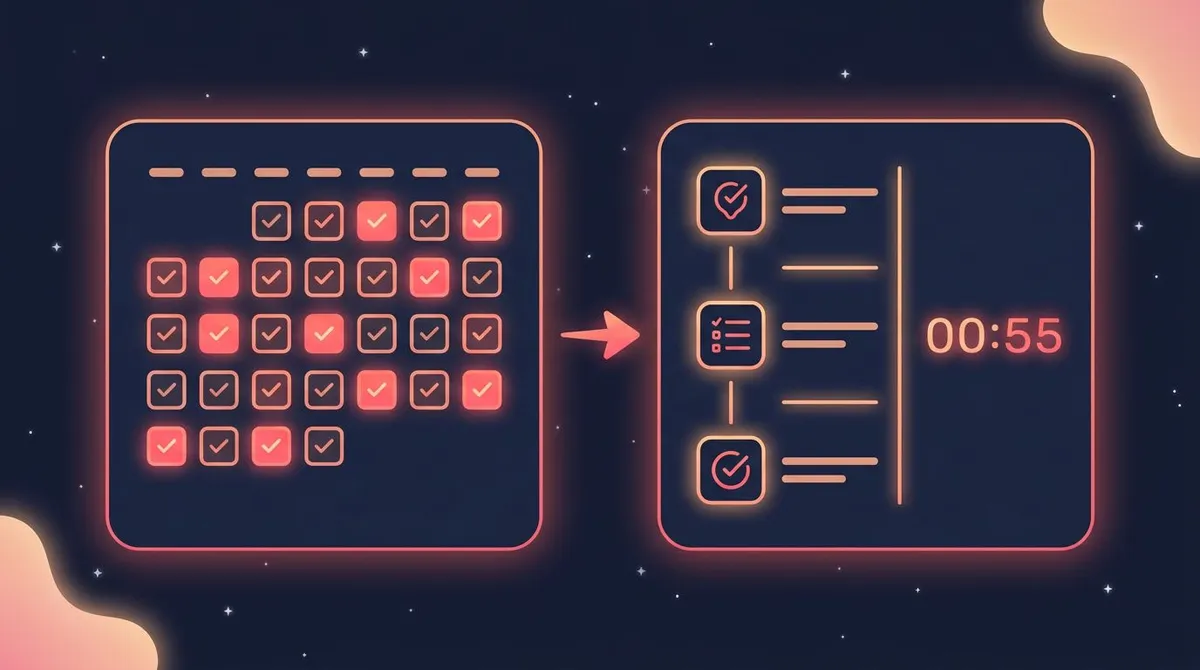
So every pick below had to pass one test: can I build an ordered morning, give each step a length, and have the app run it? Apps that only tick boxes were cut.
The feature that decides whether you keep using it
A 2025 meta-analysis pooled 49 exercise studies covering 19,883 people. It tested how plans turn into behaviour. Action planning — deciding what you will do and when — did not significantly close the gap between intent and action. Coping planning did. That is the plan for the morning that goes wrong.
That flips the buying advice. The neat sequence you build on Sunday night is action planning, and it is the cheap part.
What you are shopping for is the recovery. Can you skip a step without wrecking the run? Can you stretch one by four minutes and see the finish time move?
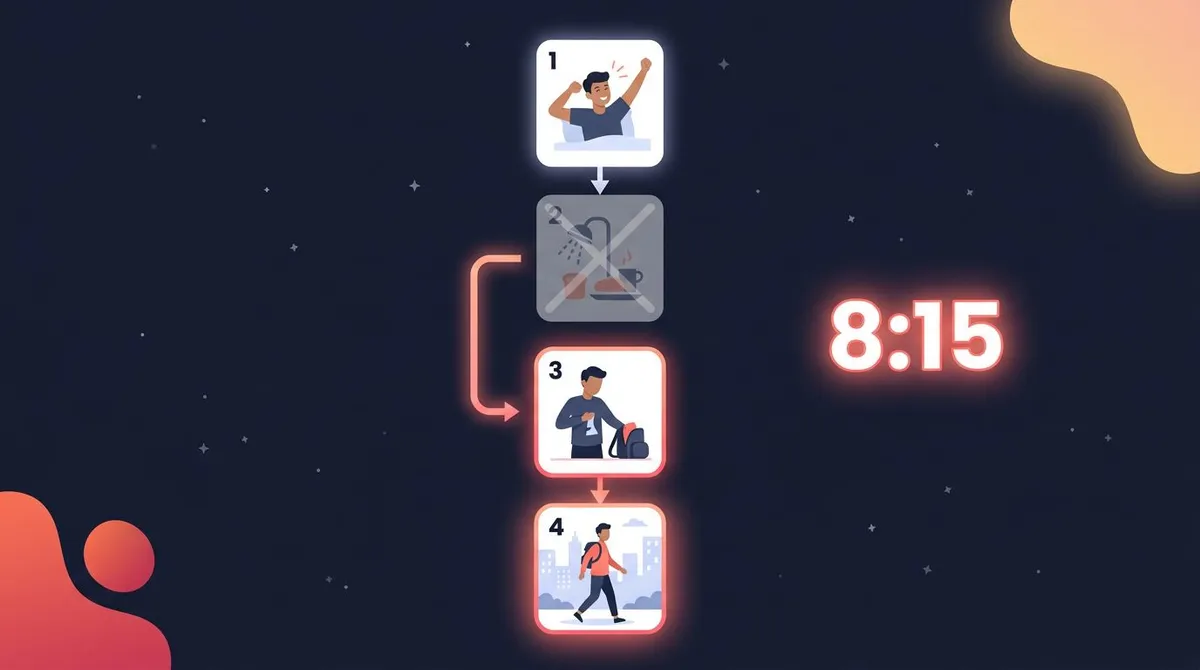
Order beats a checklist for a second reason. Wendy Wood and Dennis Rünger describe habits as responses learned in a stable context, repeated until the context itself calls up the behaviour. A fixed sequence manufactures that context. Step two always follows step one, so step one becomes the cue.
Morning routine app comparison: 7 picks side by side
| App | How it sequences | Platforms | Free tier | Paid | Best for |
|---|---|---|---|---|---|
| Routinery | Play button, per-step timer, voice prompts | iOS, Android | Core routines, limited slots | About $36 to $39.49 a year | The routine that runs itself |
| Structured | Timeline with real clock times and durations | iOS, Mac, Android | Timeline, sub-tasks, focus timer | Pro $2.99 a month, $29.99 a year, $99.99 once | A hard finish time |
| Tiimo | Visual day strip, per-task focus timer | iOS, Android, web | Basic planner, 1 profile | Around $7 to $12 a month | Time blindness |
| Fabulous | Coached ritual you tap through | iOS, Android | First journey, some habits | Premium $16.99 to $59.99 | Being told what to do |
| Brili | Routine as a playlist, clock counts down to zero | iOS, Android | Trial, then one routine | About $24.99 to $49.99 a year | A school run or shift start |
| Focus Bear | Guided routine that also blocks apps | iOS, Android, Mac, Windows | Routines capped at 3 habits | Pro $9.99 a month | A phone that eats mornings |
| Apple Shortcuts | DIY chain of actions with waits | iPhone, iPad, Mac | Everything | None | Free, if you like tinkering |
Both stores run promotions and regional prices, and several apps show more than one price at once. Every figure above came from the app's own store listing or pricing page in September 2026. Check the number on your screen before you subscribe.
The 7 best morning routine apps, reviewed
1. Routinery — best morning routine app overall
Routinery is the app the whole category is copying. You build a morning as a list of steps, give each one a length, then press play. A timer runs the current step and a voice reads out the next one. You never touch the screen with wet hands.
The recovery tools are why it tops this list. Mid-run you can skip a step, add one, or stretch the timer, and the rest of the morning shifts to match. That is coping planning built into the interface.
It holds 4.7 stars from about 17,800 US App Store ratings and 4.5 from roughly 12,800 on Google Play. Premium runs about $36 to $39.49 a year depending on the offer you land on.
Rating: (4.5/5)
Pros
- The best mid-run controls here: skip, extend and reorder without stopping the sequence.
- Voice prompts mean you can run a routine with the phone face down.
Cons
- The free tier is tight, and the upgrade prompts arrive early.
- Long routines take real effort to set up the first time.
2. Structured — best when the morning has a hard finish
Structured sequences against the actual clock. Your steps sit on a vertical timeline with start times and durations, so 6:40 is 6:40, not "step four."
That is the right model when a train or a stand-up decides your morning. You see the collision before it happens. Pro adds Replan, which drags everything that slipped into the time you have left — the most useful recovery feature in this roundup.
The free version is unusually generous: timeline, sub-tasks, widgets and a focus timer cost nothing. It holds 4.8 stars from about 165,000 US App Store ratings and 4.5 from roughly 22,200 on Google Play. Pro is $2.99 a month, $29.99 a year, or $99.99 once.
Rating: (4.5/5)
Pros
- Clock-anchored steps show you exactly when a slow shower makes you late.
- One of the strongest free tiers of any planner on either store.
Cons
- Recurring routines sit behind Pro.
- No countdown voice guide, so it watches the morning more than it runs it.
3. Tiimo — best for time blindness
Tiimo is built for people who lose track of time rather than motivation. The day shows up as a coloured strip you can see at a glance, and each task opens into a calm countdown.
It came out of the neurodivergent community and it shows: gentle transitions, big visual blocks, no shouting. Apple named it iPhone App of the Year in 2025.
It holds 4.6 stars from about 19,400 US App Store ratings, though Android is thinner at 4.4 from roughly 1,500. Pro lands around $7 to $12 a month, with a 7-day trial on the yearly plan.
Rating: (4/5)
Pros
- The clearest visual read of "where am I in the morning" of any app here.
- Syncs with Apple Calendar and Reminders, so the routine sits beside real events.
Cons
- The Android version lags the iPhone one.
- Pricing is high for what is, at heart, a visual planner.
4. Fabulous — best if you want to be told what to do
Fabulous is the odd one out. Instead of asking you to design a morning, it hands you one and coaches you through it, unlocking habits over days. If a blank routine builder is where you stall, that is a real advantage.
Be clear on the trade. You get a ritual and audio coaching, but little control over step lengths, and the sequence is looser than Routinery's.
The store split is worth knowing. It holds 4.4 stars from about 89,000 US App Store ratings, but only 3.9 from roughly 341,000 on Google Play, where billing complaints dominate the low reviews. Premium plans run $16.99 to $59.99.
Rating: (3.5/5)
Pros
- Zero setup. Day one gives you a morning that already works.
- The coaching audio is genuinely well produced.
Cons
- Weak step timing, and a lot of features you did not ask for.
- Cancellation is a recurring complaint on Google Play.
5. Brili Routines — best for a school run or shift start
Brili treats a routine as a playlist with a deadline. Its visual clock works backwards from when you must be out of the door and shows how much slack is left. Dawdle over breakfast and you watch the buffer shrink.
That pressure is the point, and it is why Brili gets recommended for ADHD households and for kids who cannot yet read a clock face.
It is the smallest app here by ratings: 4.6 stars from 600 US App Store ratings and 3.9 from roughly 570 on Google Play. The iOS build was last updated in November 2025. Plans run about $24.99 to $49.99 a year.
Rating: (4/5)
Pros
- The countdown-to-zero clock is the best "you are running late" signal in this list.
- Works well for a parent running someone else's morning.
Cons
- Tiny user base and slow updates.
- The reward layer feels childish for a solo adult.
6. Focus Bear — best when your phone is the problem
Focus Bear guides you through a morning routine and blocks distracting sites and apps while it does. If your routine dies the moment you open a feed, no timer alone will fix that. This one removes the exit.
It runs on the desktop too, which matters if your morning ends at a laptop. It was built by a team with ADHD and autism, and the strictness is adjustable.
It is early on mobile. The iPhone app holds 4.5 stars from just 13 ratings and Android sits at 3.4 from 94 — thin numbers, so treat the trial seriously. Free Essentials includes morning and evening routines capped at three habits. Pro is $9.99 a month with a 7-day trial.
Rating: (3.5/5)
Pros
- The only pick that sequences the morning and blocks the distraction.
- A real free tier for a three-step routine.
Cons
- Very few mobile ratings to judge stability by.
- The blocking can feel heavy-handed on a slow morning.
7. Apple Shortcuts — best free option on an iPhone
Apple Shortcuts is already on your phone and nobody thinks of it here. A shortcut is an ordered list of actions, and Wait actions turn that list into a timed sequence.
Chain it: start a six-minute timer, read the weather, open your notes, play a playlist. Then set a personal automation for 6:30 so it fires on its own.
It holds 4.2 stars from about 8,500 US App Store ratings, which reflects the fiddliness rather than the idea. No Android equivalent is this capable out of the box.
Rating: (3.5/5)
Pros
- Free, offline, and it drives your other apps.
- No subscription, ever.
Cons
- You build the whole thing yourself, and it breaks quietly.
- Nothing shows you progress through the sequence.
Popular apps that did not make the list
Three names come up constantly in this search, and none of them sequence.
Me+ Lifestyle Routine is huge — 4.8 stars from about 248,000 US App Store ratings and 4.7 from roughly 720,000 on Google Play. But it is a self-care checklist with reminders. You tick items; it does not run them.
Alarmy solves the step before the routine. Its missions make you solve maths or take a photo before the alarm stops, which is the right tool if the problem is leaving the bed — see how to wake up energized for that half. It does not run what happens next.
Grid habit trackers — Habitica, Streaks, Loop and the rest — record the morning rather than drive it. Plenty of people use both: a sequencer for the twenty minutes, a tracker for the pattern over a month. If that is your setup, HabitBox covers the tracking side on iPhone and Android, and our best habit tracker apps roundup compares the field.
How to choose in one minute
Pick Routinery if you want to press one button and be led. It is the default answer.
Pick Structured if a train, a school bell or a stand-up sets your finish time.
Pick Tiimo if you lose twenty minutes without noticing. Our guide to productivity apps for ADHD goes deeper.
Pick Fabulous if designing a routine is where you quit.
Pick Brili if you run a child's morning as well as your own.
Pick Focus Bear if the phone is the leak, and Apple Shortcuts if you will not pay and you enjoy building things.
Build your first sequence in ten minutes
The app is the easy half. The routine is the part people get wrong, usually by making it too long.
- Write down the morning you already have. Not the ideal one. The real one, with the scroll in it.
- Time it once. A shower is rarely eight minutes.
- Pick three steps, not eight. A three-step morning you finish beats a nine-step one you drop by day four.
- Give each step a length you can hit on a bad day. Our habit stacking builder helps you chain them in a sane order.
- Write the short version now. Decide today what you cut when you wake up late. That is the coping plan the research points to, and it is the step everyone skips.
- Run it for a week before you change anything.
If you want ready-made sequences to start from, we have a five, twenty and forty-five minute self-care morning, a fifteen-minute stack for anxious mornings, and routines sorted by life stage. The general method sits in how to create a routine that sticks.
The bottom line
Most morning routine apps sell you the plan. The plan is not the problem — almost everyone can write a good morning down.
Buy for the recovery instead. The app that lets you skip step two at 7:10 and still walk out at 7:40 is the one you will still be running in March.
Routinery does that best. Structured does it best against a clock.
FAQ
What is the best app for a morning routine?
Is there a free morning routine app?
What is the best morning routine app for Android?
Do morning routine apps actually work?
What is the difference between a morning routine app and a habit tracker?

Mira Hartwell
Editor, HabitBoxEditor at HabitBox. Writes about habit science and productivity, grounding every post in named research (Lally, Wood, Walker, Huberman) instead of recycled advice. Read full bio →