Notion Habit Tracker: Setup Guide + 7 Free Templates (2026)
TL;DR. To build a Notion habit tracker, create a table database with a date property and one checkbox per habit. Then add a recurring template that creates each day's row for you, and a formula that shows your completion as a progress bar. The build takes about 15 minutes — or skip it and grab one of the 7 free templates below.
Notion is where a lot of people already plan their week, take notes, and run their to-do lists. So tracking habits there feels natural: one more database, zero new apps. And unlike a paper tracker, it can compute your completion rate for you.
This guide covers the full setup — database, daily rows, progress bar, views — then a curated list of free templates if you'd rather not build from scratch. And because plenty of DIY trackers quietly die by week three, it ends with an honest look at where Notion works well for habits and where it starts to fight you.
Why track habits in Notion?
Notion's pitch for habit tracking is context. Your habits can live next to your journal, your goals, and your weekly review — one workspace, one source of truth. If you're already deciding between workspace tools, our Notion vs Todoist comparison covers that landscape in detail.
Three things make it a genuinely good fit for some people:
- It's flexible. You choose the habits, the layout, the views, and the formulas. No app decides for you.
- It's free. Notion's personal plan costs nothing, and the template gallery is full of free habit setups.
- It connects to the rest of your system. A habit row can link to a journal entry, a project, or a goal page.
The trade-off is friction, especially on your phone. We'll get to that. First, the build.
How to build a Notion habit tracker (step by step)
You need one database, a handful of properties, and about 15 minutes. Here's the exact sequence.
Step 1: Create a table database
On a new page, type /table and choose Table view, then select New database. Name it something you'll recognize on a small screen — "Habits" beats "Daily Consistency Dashboard 2.0".
Each row in this database will be one day. The default title property becomes the day's label, so rename it to Day.
Step 2: Add a date property and one checkbox per habit
Add a Date property first — every view you build later hangs off it. Then add a Checkbox property for each habit you want to track.
Start with 3 to 5 habits, not 12. Habit formation research from University College London (Lally et al., 2010) found new behaviors take a median of 66 days to become automatic. Overloading the list is the fastest way to abandon it. You can add more once the first few stick.
Step 3: Set up a recurring daily template
This is the step most DIY trackers skip, and it's the one that keeps yours alive. Open the database's template menu, create a template called "Today", and set its date to "Today" (the dynamic "date when duplicated" option, not a fixed date). Then set the template to repeat daily at a time you choose — Notion documents this under database templates.
Now a fresh row appears every morning without you creating it. If a tracker requires setup work before you can even check a box, it's already losing.
Step 4: Add a progress bar formula
Add a Formula property called "Progress" that averages your checkboxes. For three habits named Meditate, Read, and Move, the formula looks like this:
(toNumber(prop("Meditate")) + toNumber(prop("Read")) + toNumber(prop("Move"))) / 3The result is a number between 0 and 1. In the property's display options, choose to show it as a bar or ring.
Each day's row now carries a small visual of how the day went — which matters, because seeing progress is what makes tracking motivating rather than clerical. James Clear makes this case well in his guide to habit tracking: the tracker itself becomes a reward.
Step 5: Add weekly and calendar views
One table of every day ever is unreadable by February. Add two views:
- This week — a table view filtered to
Date is within → this week. This is your daily working view. - Calendar — a calendar view on the Date property. This is your month-at-a-glance, the closest Notion gets to a streak heatmap.
Drag the checkbox columns into the order you do them each day. Small thing, big difference on mobile.
Step 6: Run it for a week before customizing
The formulas, the colored tags, the aesthetic header image — all of that can wait. Track for one full week first and notice where the friction is. Which habit do you skip? When do you check in?
Most people find the tracker needs to be reachable in two taps or it doesn't get used. Pin the page to your favorites, and put checking it inside an existing routine — right after your morning coffee, for instance. That cue-based approach is the core of building consistency in any system.
7 free Notion habit tracker templates
If you'd rather start from a working setup, these seven are free, and each takes a different angle. All of them can be duplicated into your workspace in one click.
| Template | Best for | Layout |
|---|---|---|
| Notion's Habit Tracker | First-time setup | Daily/monthly table |
| Habit Tracker 2026 | Automation fans | Auto-created daily rows |
| Minimal Habit Tracker | Clean one-page setup | Buttons + calendar + chart |
| Habit Tracker with Charts | Data lovers | Charts dashboard |
| Weekly Habit Tracker | Week-by-week focus | Weekly grid |
| Monthly Habit Tracker 2026 | Month-at-a-glance | Monthly checkoff board |
| Thomas Frank's Habit Tracker | Paper-tracker feel | Minimalist grid |
1. Notion's Habit Tracker
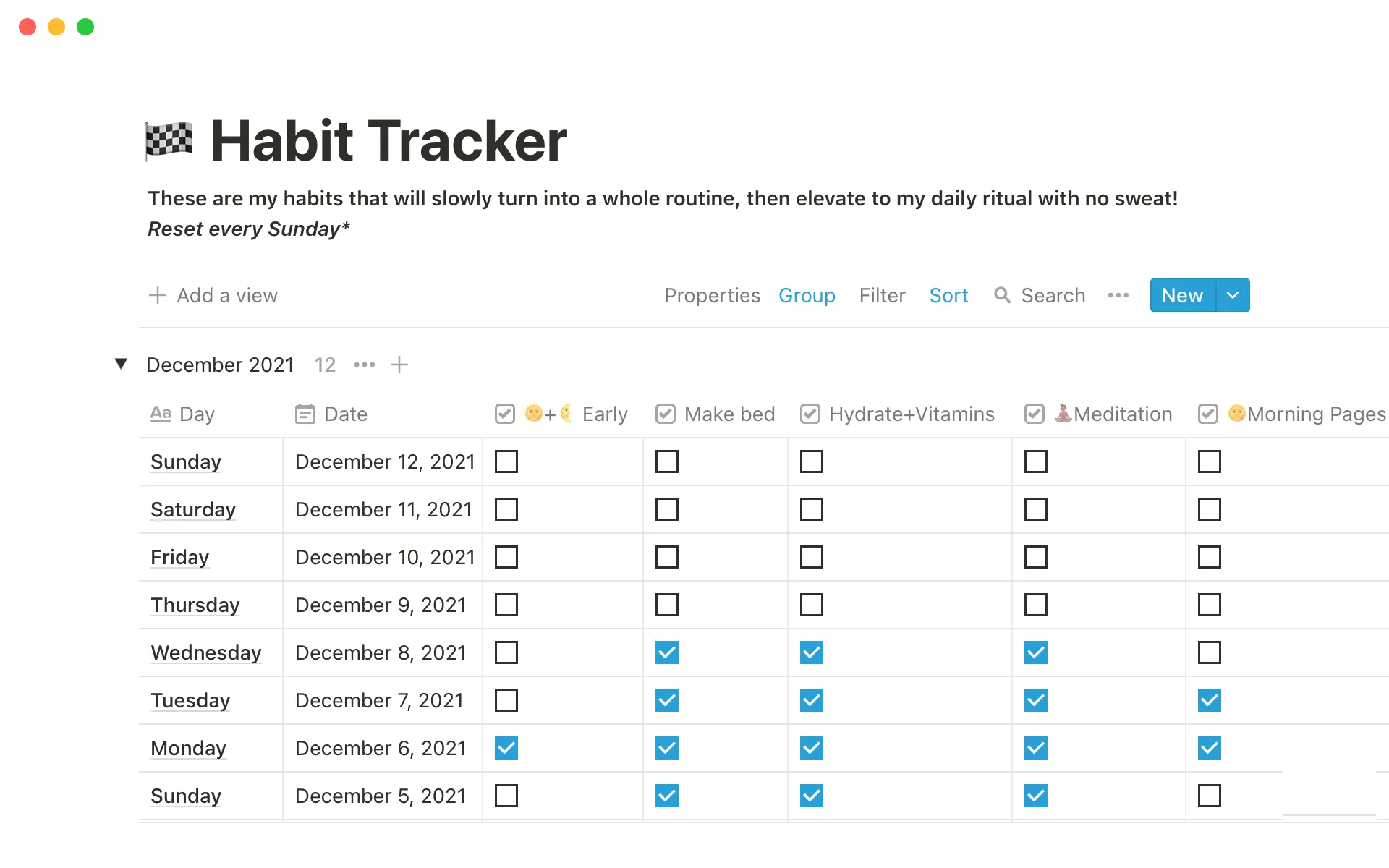
Source: the template's Notion Marketplace listing. This is the creator's published preview, with older sample dates and interface styling; it is not a capture of the database built in this guide.
The gallery's habit tracker, from creator Alysha Marwaha, breaks habits down by day or by month with no extras. It's the fastest way to see whether Notion habit tracking suits you before you invest in anything fancier.
2. Habit Tracker 2026
This automated tracker leans on recurring templates so daily rows create themselves. Pick it if you want the Step 3 behavior above without building it.
3. Minimal Habit Tracker
Made by matt.notion, the Minimal Habit Tracker pairs one-tap logging buttons with a calendar and an automatic progress chart. It's the best balance of clean and capable on this list.
4. Habit Tracker with Charts
HeyAlbert's Habit Tracker with Charts uses Notion's chart views to turn your checkboxes into graphs. Satisfying if completion-rate trends are what keep you going.
5. Weekly Habit Tracker
A bright weekly grid that resets your focus every Monday. Good for people who find a monthly wall of checkboxes discouraging after one missed day.
6. Monthly Habit Tracker 2026
The opposite philosophy: a month-at-a-glance board where you check off each habit day by day and watch the month fill up. Closest to a classic paper tracker grid.
7. Thomas Frank's Habit Tracker
Productivity YouTuber Thomas Frank built a minimalist tracker inspired by analog, paper-based systems. Well documented, deliberately simple, and from one of the most respected Notion builders around.
Where Notion shines — and where it breaks down
Here's the honest part. A Notion habit tracker is genuinely great in some situations and quietly terrible in others, and most articles skip the second half.
Notion shines when your habits are part of a bigger system you review on a laptop. Weekly reviews, journaling alongside your checkboxes, linking habits to goals — no habit app matches that depth of context.
It breaks down at the moment of check-in. The habit happens in the kitchen at 7am, and your tracker is a database three taps and one loading spinner away.
Missed check-ins pile up, backfilling starts, and by week four the tracker is fiction. It's the same failure pattern that kills spreadsheet trackers — the system works; the access to it doesn't.
| Notion tracker | Dedicated habit app | |
|---|---|---|
| Check-in speed | Open app → find page → load → tap | One tap from home screen |
| Reminders | Date reminders only, per page | Per-habit, recurring |
| Streaks & stats | DIY formulas | Automatic |
| Flexibility | Nearly unlimited | Fixed by design |
| Context (notes, goals) | Excellent | Minimal |
| Setup time | 15+ minutes | Under 2 minutes |
Two gaps matter most in practice. Notion has no per-habit recurring notifications — you can attach a reminder to a date, but not "nudge me about flossing every night at 9pm". And streaks, the single most motivating mechanic in habit tracking, require formula gymnastics that most people never set up.
A dedicated tracker flips those trade-offs. Our own app, HabitBox, for example, gives you one-tap check-ins, per-habit reminders, and automatic streaks with a calendar heatmap — no formulas, no account, and your data stays on your device.
Some people run both: Notion for the weekly review and goal planning, a phone app for the daily check-in itself. If that split sounds right, our guide to the best habit tracker apps compares the options, and there are solid free habit trackers if budget is the concern.
The test is simple: if your last three check-ins happened more than an hour after the habit, your tracker has a friction problem, not a motivation problem.
FAQ: Notion habit tracker
Does Notion have a built-in habit tracker?
How do I make a habit tracker in Notion?
Is Notion good for habit tracking?
Can Notion send me habit reminders?
Do Notion habit tracker templates cost money?
The bottom line
A Notion habit tracker is a real option, not a compromise — build it in 15 minutes, keep it reachable in two taps, and start with fewer habits than you think. And if the check-in friction wins anyway, don't conclude that you lack discipline. Change the tool, not the goal.

Mira Hartwell
Editor, HabitBoxEditor at HabitBox. Writes about habit science and productivity, grounding every post in named research (Lally, Wood, Walker, Huberman) instead of recycled advice. Read full bio →