Grit App Review 2026: Which Grit Did You Find?
Search grit app and you get four different products, plus a TV channel. The one most people mean — Grit: Daily Habit Tracker by GrittyApps — is Apple-only, holds 4.8 stars from about 15,700 App Store ratings, and stops you at three habits until you pay. Here is how to tell them apart.
Almost every result you will find for this search is a store listing or a download mirror. Nobody sorts out which Grit is which. That is the job of this page, and it comes before the review, because half the people reading this have the wrong app open.
Which Grit did you find?
Start here. Find the row that matches what is on your screen, then decide whether the rest of this page is for you.
| App and developer | Where you found it | Platforms | What it does | Cost |
|---|---|---|---|---|
| Grit: Daily Habit Tracker — GrittyApps | App Store, top result for the search | iPhone, iPad, Mac, Apple Watch, Apple Vision | Habit and routine tracker with Apple Health sync, widgets, timers and stats | Free to download, Grit Premium in-app |
| Grit — shub39 | F-Droid, Google Play, GitHub | Android 10 and up | Open-source to-do list plus habit tracker | Free, GPL-3.0 licence |
| GRIT: Accountability Partners — Magpie Technology | thegritapp.com, both app stores | iPhone, Mac, Android | Squads of 2 to 8 people who check each other's weekly proof photos | Free to download, $1 a month or $12 a year |
| Grit: Improve Daily With Ai — Sparktonic | App Store, Health & Fitness | iPhone, iPad | AI coaching prompts and motivation, 4.1 stars from 17 ratings | 3-day trial, then $6.99 a week |
| Grit — the TV channel | grittv.com | Broadcast and streaming | Westerns and action reruns. Not a habit app at all. | Free to watch |
If you are here for the habit tracker, you want row one, and the rest of this page is about that app only. If you landed on row two, three or four, the table above is your answer and you can stop reading.
How to check which Grit you already installed
The icons look nothing alike, but the names in your app list are close enough to fool anyone. Check the developer instead.
- On iPhone or iPad, open the App Store, tap your account picture, then Purchased, and find Grit. The line under the name is the developer: GrittyApps, Magpie Technology Limited, or Sparktonic, LLC.
- On Android, open Google Play, go to Manage apps and device, then Manage, and tap Grit. The developer line reads shub39 or thegritapp.
- Fastest test of all: open the app and try to add a fourth habit. If you hit a paywall, you have the GrittyApps tracker.
There is one more wrinkle worth knowing. GrittyApps names the same app differently by country. On the US App Store it is "Grit: Daily Habit Tracker." In the UK and Norway the same listing is called "Grit: Habits, Routines, Goals." In Germany it is "Grit: ADHS Gewohnheitstracker." Same app, same developer, three names — so a friend's recommendation may not match what you see in your own store.
Grit: Daily Habit Tracker, reviewed (GrittyApps)
Everything from here down is about row one. None of it applies to the other three apps.
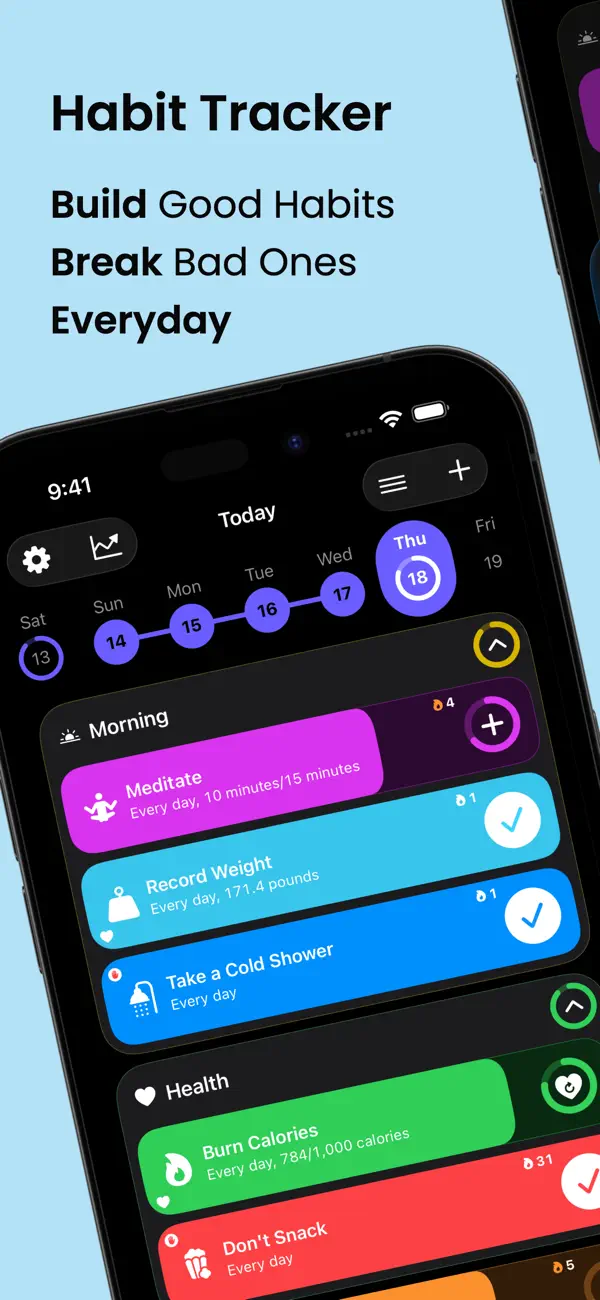
Grit is a habit and routine tracker built by GrittyApps, a small indie developer. It sits in the Productivity category and runs on iPhone, iPad, Mac, Apple Watch and Apple Vision. The App Store listing shows 4.8 stars from 15,721 ratings, a 185 MB download, 22 languages, and a 4+ age rating.
The core loop is what you would expect. You create a habit, pick how it is measured, and check it off each day. What lifts Grit above a plain checkbox app is how much it lets you tune each of those steps.
Habit types. A habit can be a simple yes/no, a count, or a duration in minutes. You can tie a habit to Apple Health, so steps or activity data mark it done without you touching the app.
Groups and routines. Related habits can be bundled into groups — a morning block, an evening block, a work block. You can also exclude a habit from your daily progress score, which is a small thing that matters when one habit is weekly and the rest are daily.
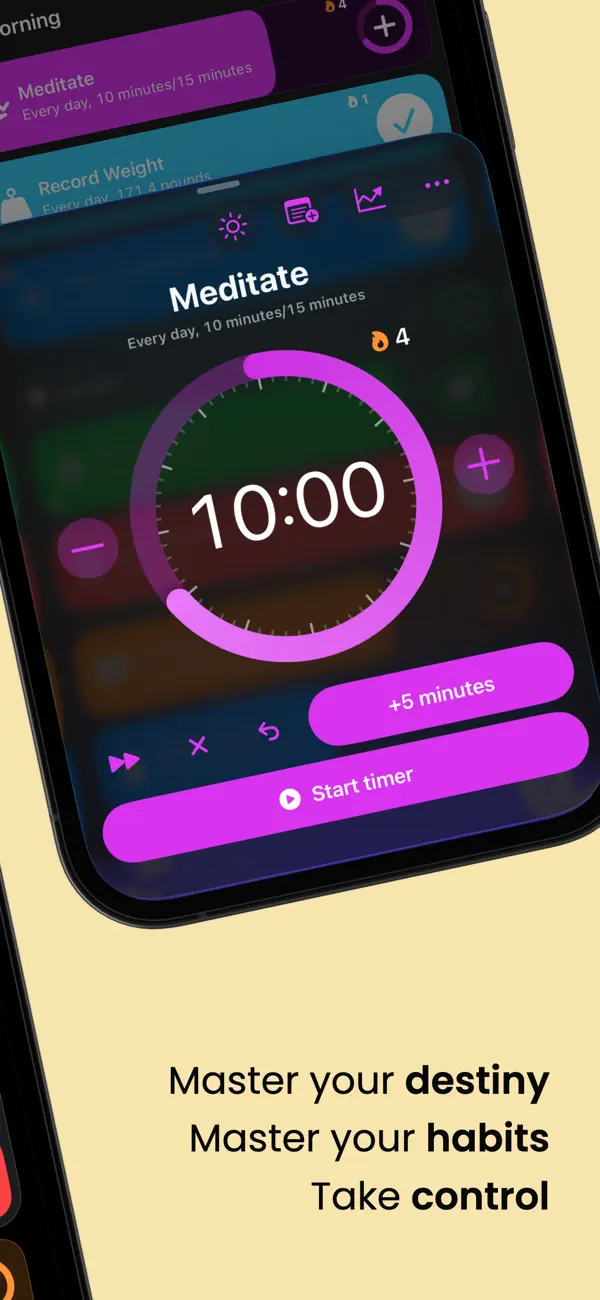
Timers. Duration habits get a built-in timer. Recent versions added interval alerts and an auto-stop when the habit hits its goal, so a 20-minute reading block ends itself.
Widgets. Grit ships a full widget set, including a streak widget and an interactive weekly one you can tap from the home screen. If widgets are the reason you open a tracker at all, our guide to habit tracker widgets covers what to look for.
Siri and shortcuts. Custom Siri commands let you log a habit by voice.
Version 5.8.1 shipped in August 2026 and added app blocking until a habit is done, a Weekly Recap screen, progress charts inside the habit list, and nine new languages. That is a lot of shipping for one release.
The rating spread is worth a look too, because a 4.8 average can hide a lot. Of those 15,721 ratings, 13,952 are five stars and 319 are one star. That is a heavily positive base with a small, loud unhappy tail — and reading that tail, much of it is about price rather than the app itself. People who pay tend to stay. People who meet the paywall in minute five tend to leave a one-star review on the way out.
Grit app pricing: what the free tier actually gives you
Grit is free to download. The free version caps you at three habits, and the statistics screens are locked. Everything past that needs Grit Premium.
Here is the split, based on the current App Store listing and what users report in reviews.
| Free | Grit Premium | |
|---|---|---|
| Active habits | 3 | Unlimited |
| Daily check-ins, streaks | Yes | Yes |
| Detailed statistics | No | Yes |
| Groups, timers, widgets | Yes | Yes |
| Apple Health sync | Yes | Yes |
| Price | Free | See the range below |
Now the awkward part: there is no single price. Apple lists ten separate Grit Premium products on the US store, because the developer has run promotions and regional tiers over the years and old ones stay visible. Monthly options appear at $1.99, $2.99 and $9.99. Yearly options appear at $12.99 and $29.99. Lifetime appears at $19.99, $24.99 and $44.99.
You will only be offered one of those, and which one depends on your country, when you installed, and whether a promotion is running. Open the paywall and read the number in front of you. Do not budget from a figure you read anywhere else, including here.
Grit also runs a free trial before the subscription starts, which several reviewers mention taking. Two things to know if you do. It converts to a paid plan unless you cancel, and reviewers report being asked to rate the app on first launch, before they had used it — worth remembering when you weigh that 4.8. You can cancel either from Settings, Subscriptions on your device, or inside Grit under Settings, Help and Support.
Is three habits enough to get anywhere? It depends what you are doing with them. Phillippa Lally and colleagues at University College London tracked how long new habits took to feel automatic and found a median of 66 days, with a range from 18 to 254. Three slots gives you room to run one or two behaviours through that whole window, which is a real trial, not a demo.
BJ Fogg makes the case that this is the right way to start anyway. His Tiny Habits method is built on starting with something almost embarrassingly small and letting it grow. Under that reading, a three-habit cap is a nudge, not just a paywall. If you are still deciding what belongs in those slots, our list of habits worth tracking is a good place to narrow it down.
The catch is the second half. Locking statistics behind the paywall means the free tier can log your habits but cannot show you what they add up to. James Clear argues in an excerpt from Atomic Habits that tracking is its own reward — seeing the progress is what motivates you. A free tier that records but never reports gives you half of that.
If a hard cap is a dealbreaker, our roundup of genuinely free habit trackers covers the apps that do not gate the basics.
What Grit does better than most habit trackers
Grit is a better-resourced app than most of its rivals on Apple hardware, and it earns the 4.8 stars. Four things stand out.
The Apple Watch app is a real app. Most trackers ship a Watch companion that shows a list and nothing else. Grit lets you start timers, complete habits and reach your data from the wrist, with Control Center support. One five-star reviewer, who had "almost tried them all," singled out exactly that: setting timers and completing habits from the Watch, then seeing the same data on the Mac.
Apple Health integration goes both ways. Habits can read from Health, so a step goal or a workout closes itself. Version 5.8.1 added Stand or Roll Hours and State of Mind as sources. If your habit is already being measured by your phone, you stop double-logging it.
The developer answers people. Scroll the App Store reviews and you find replies from GrittyApps on both praise and complaints, including polite pushback with an actual answer. One long-time user wrote that they finally left a review after the developer shipped a change they had asked for "after merely a week." That responsiveness is rare from indie apps at this size, and it shows up in the release notes.
Statistics have depth — once you pay. Reviewers who buy Premium describe per-habit charts, success rates, and comparison views, not just a streak counter. It is not universally loved; one three-star reviewer wants raw numbers rather than overlapping line graphs. But the data is there.
Grit also handles two edge cases that break other trackers. You can set the hour your day starts, so shift workers do not fail every habit at midnight. And you can schedule a habit for specific days of the week or month rather than every day.
Where Grit falls short
The headline limitation is not a missing feature. It is a boundary drawn around the hardware you own, and it is the one thing you should decide on before you pay for anything. Everything else on this list is smaller.
Grit is Apple-only, and its sync is iCloud. iPhone, iPad, Mac, Watch and Vision — that is the whole list. There is no Android version and no sign of one. Because sync runs through your iCloud account rather than a Grit account, there is no Android app on the other end to sync into. Switch to Android and your history does not come with you.
That matters more than it sounds. Wendy Wood's research on habit and context — summarised in her book Good Habits, Bad Habits — finds that a large share of daily behaviour repeats in the same setting, triggered by cues rather than decisions. Your phone is one of those cues. A tracker that only exists on hardware you might replace in two years is a cue with an expiry date. Users have asked for an Android version in App Store reviews, and it has not arrived.
Statistics sit behind the paywall. Covered above, but worth repeating as a limitation and not just a price. Several reviewers describe hitting the three-habit wall within the first five minutes, before they had any sense of whether the app suited them.
Habit stacking hits the cap fast. Three slots is fine for one behaviour. It is tight the moment you want to chain habits together, which is the point at which most people find tracking useful. Fogg's argument cuts both ways here — starting small is right, but a stack of three linked micro-habits fills the free tier completely.
The pricing display is a mess. Ten visible Premium products is confusing, and at least one reviewer reported a lifetime purchase that stopped being recognised after a couple of months. Restore Purchases exists, but keep your receipt.
It is a tracker, not a planner. Grit does not do calendar events, one-off tasks tied to a time of day, or general to-dos. Several four-star reviews are people asking for exactly that. If you want one app for tasks and habits, this is not it.
Which Grit is right for you
Work back from the table at the top.
You are on Apple hardware and want depth. Take Grit by GrittyApps. The Watch app, Health integration and statistics are genuinely strong, and the developer is present. Budget for Premium — the free tier is a trial, not a plan. If you want a second opinion in the same shape, Strides is another Apple-only tracker with the same three-item free ceiling.
You are on Android and want free and open. Take shub39's Grit. It is a to-do list and habit tracker under a GPL-3.0 licence, current at version 6.0.7, and it costs nothing. It is a simpler app than the Apple one and makes no secret of that.
One detail on that second Grit: the two download sources are not identical. The F-Droid build is built from source, needs Android 10 or newer, weighs about 9 MB, and carries no purchases at all. The Google Play listing shows an in-app purchases label, so check what it offers before you assume everything is unlocked. Either way there is no subscription and no account.
You need other people watching. Take GRIT: Accountability Partners. Squads of two to eight, weekly targets, proof photos your squad can see. That is a different product category from a private tracker. If social pressure is the mechanism you respond to, our Habitica alternatives guide covers the gamified and group end of this market.
You want the same history on an iPhone now and an Android phone later. None of the above. You need a tracker that ships a real app on both platforms, so changing phones does not mean starting from zero. HabitBox is one of those — it runs on iOS and Android, keeps habits on the device with no account or sign-up, and moves your record between phones with a Plus export and import file. It is free to start, with an optional Plus upgrade. For a wider shortlist, our best habit tracker roundup compares the main options side by side.
Whichever you pick, the app matters less than the record. As our guide to tracking habits argues, the visible chain is what keeps most people going, and any tracker that survives on your phone for 66 days beats a better one you abandoned in week two.
Grit app FAQ
What is the Grit app?
Do you have to pay for the Grit app?
How much is the Grit app?
Is the Grit app on Android?
Is the Grit habit tracker the same as the GRIT accountability app?
Is the Grit app worth it?

Mira Hartwell
Editor, HabitBoxEditor at HabitBox. Writes about habit science and productivity, grounding every post in named research (Lally, Wood, Walker, Huberman) instead of recycled advice. Read full bio →